Wireless RGB Hot-Swap Keyboard with TFT & Gasket Mount
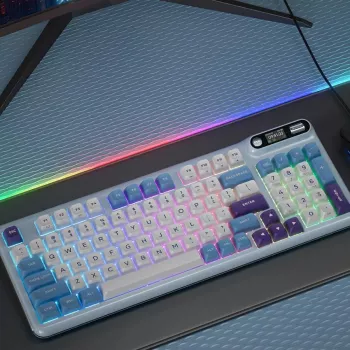
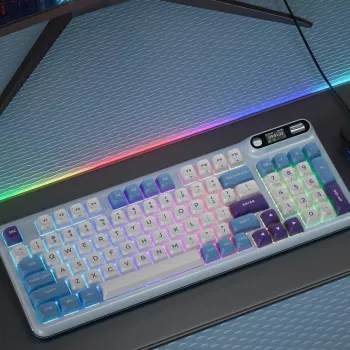
Wireless RGB Mechanical Keyboard with TFT Screen & Hot-Swap Gasket Design
A feature-rich mechanical keyboard can be both a daily work tool and a tuned-in hobby build. This model pairs wireless connectivity with per-key RGB, a customizable TFT screen, hot-swap switch support, and a gasket-style mounting structure—aimed at smoother typing feel, easier customization, and cleaner desk setups.
Whether it’s for spreadsheets, coding, or late-night gaming, the biggest win is flexibility: run wireless for an uncluttered desk, switch to wired when you want guaranteed stability, then fine-tune the feel over time by swapping switches and dialing in lighting and screen behavior.
What Makes This Keyboard Different
- Wireless flexibility for cleaner desk layouts while keeping a responsive mechanical feel.
- TFT screen for at-a-glance status and personalization (profiles, effects, battery, or custom visuals depending on firmware/software support).
- Hot-swap sockets to change switches without soldering—useful for experimenting with feel and sound.
- Gasket-style design intended to soften bottom-out and reduce harsh vibrations.
- RGB lighting for visibility and aesthetics, with multiple effect modes and brightness controls.
Key Features at a Glance
- Connectivity: use wireless mode for mobility and a wired option for charging and stable sessions.
- Display: TFT screen can act as a small dashboard and personalization element.
- Customization: hot-swap switch compatibility supports quick switch swaps and mixed switch builds.
- Typing acoustics: gasket structure can help create a more muted, less ping-prone sound profile (final results depend on switches, keycaps, and case tuning).
- Lighting: RGB patterns can be adjusted for gaming, streaming backgrounds, or low-light productivity.
Quick Spec Checklist (What to Confirm on Arrival)
| Item | What to Look For | Why It Matters |
|---|---|---|
| Wireless modes | Presence of wireless toggle / pairing steps in manual | Ensures easy switching between devices and stable connection |
| Charging / wired use | Cable included and port type | Allows uninterrupted use while charging |
| Hot-swap support | Hot-swap sockets and supported switch type listed | Determines which switches can be installed without soldering |
| TFT screen functions | Menu options and customization method | Sets expectations for what the screen can display/control |
| RGB control | Onboard shortcuts and/or software options | Faster adjustments without digging through settings |
TFT Screen: Practical Uses and Customization Ideas
A small TFT screen changes the vibe of a mechanical keyboard. Instead of relying on guesswork (or hunting through software), it can provide quick confirmation that your setup is behaving the way you expect.
- Status dashboard: battery level, connection mode, active layer/profile, time/date (if supported).
- Visual personalization: logos, pixel-style graphics, or simple animations (depends on onboard memory and supported formats).
- Workflow boosts: quick confirmation of which device is connected and which profile is active.
- Streaming/desk aesthetics: subtle companion display that matches lighting themes.
- Tip: keep brightness moderate to extend battery life and reduce distraction in dark rooms.
If you’re curious about the standards behind how keyboards talk to computers, references like the USB HID Specification are a helpful baseline for understanding why most boards “just work” once connected.
Hot-Swap Switches: How to Dial In Feel and Sound
Hot-swap support is the feature that turns a keyboard from a fixed purchase into a platform. Instead of being locked into one switch type, you can adjust the typing experience with minimal tools and minimal downtime.
- Switch variety: linear for smooth travel, tactile for feedback, clicky for audible confirmation (choice depends on environment and preference).
- Mix-and-match builds: use heavier switches for modifiers and lighter switches for alphas, or tune gaming clusters differently.
- Maintenance: replacing a faulty switch becomes a quick swap instead of a teardown and solder job.
- Comfort: dialing in actuation force can reduce fatigue during long typing sessions.
- Handling: use a proper switch puller, pull straight up, and align pins carefully to avoid bending.
For a quick overview of how common mechanical switch families are designed, Cherry’s switch pages are a solid starting point: Mechanical keyboard switch fundamentals (Cherry MX overview).
Gasket Design: What It Changes in Daily Use
A gasket-style mount typically aims to isolate the plate/PCB assembly from the case. In plain terms, it’s a design approach meant to reduce harshness and make keystrokes feel less abrupt.
Wireless Performance, Battery Habits, and RGB Tradeoffs
If your primary wireless mode is Bluetooth, the Bluetooth Core Specification provides background on how devices negotiate connections and power states—useful context for why sleep/timeout settings matter.
Setup Checklist (First Day)
Shop In-Stock Picks
- Wireless RGB Mechanical Keyboard with TFT Screen & Hot-Swap Gasket Design — a customization-friendly wireless board with screen personalization, hot-swap flexibility, and a gasket-style build.
- Professional 1875W Hair Dryer with Negative Ions & Brushless Motor for Fast Drying — a high-power option for faster routines if you’re upgrading more than just your desk setup.
- Interactive Soccer Table Game for Kids — a fun add-on for family spaces or a game room corner.
FAQ
Does hot-swap mean any mechanical switch will fit?
No. Hot-swap compatibility depends on the socket type and the switch pin format (and sometimes whether the switch is 3-pin or 5-pin). Confirm the supported switch family and never force a switch—bent pins can damage sockets.
What can the TFT screen display?
Common functions include battery level, connection mode, active profile/layer, and basic UI menus. Custom images or animations are usually possible only if the firmware/software supports them and the keyboard has enough onboard storage.
Will RGB and the TFT screen drain the battery quickly?
They can, especially at high brightness with animated effects. Lowering brightness, using static lighting, and enabling any sleep or screen-timeout settings typically improves runtime dramatically.















Leave a comment